Bentobox: Beautiful Ubuntu Desktop, Ready in 30 Minutes
Built on the shoulders of giants: This project is inspired by and built upon Omakub by DHH and the ambitious Omarchy project. We're grateful to the 37signals team for their vision of beautiful, opinionated Linux environments.
Ubuntu is powerful, flexible, and free. But it has a reputation: too complex, too ugly, too much work to set up. Bentobox fixes that.
"I made BentoBox to organize all of my build scripts and customization, and I find it useful—it saves me a lot of time. I'm not trying to build a company, I'm just sharing my knowledge and code in case it helps others." — Language Seed
It's a one-command Ubuntu setup that gives you a beautiful, fully-configured desktop in 30 minutes—whether you're a developer who needs to rebuild environments quickly, an everyday user looking for a Windows/Mac alternative, or someone who wants Linux as their primary OS while keeping Windows available when needed.
What is Bentobox?
Bentobox is a thoughtfully curated Ubuntu setup (forked from Omakub) that eliminates rebuild friction by streamlining dozens of Ubuntu customizations, configurations, package installations, and container deployments into a single automated process.
The name reflects our philosophy: like a Japanese bento box, we've carefully selected quality tools over quantity, each serving a specific purpose, arranged thoughtfully in a beautiful container.
🎯 Who Is This For?
Bentobox solves different problems for different people:
For Everyday Users: The Windows/Mac Alternative
Tired of Windows but intimidated by Linux? Bentobox is Ubuntu made beautiful and approachable.
Perfect if you:
- Want to escape Windows bloat, telemetry, and forced updates
- Can't afford a Mac or don't want vendor lock-in
- Need a computer that just works and looks beautiful
- Don't want to spend days learning terminal commands
You get: Chrome, VLC media player, Obsidian for notes, LibreOffice, and a beautiful desktop with 60+ professional wallpapers. No technical knowledge required—the GUI installer walks you through everything.
For Developers: Eliminate Rebuild Friction
Tired of spending 2-3 days rebuilding dev environments? Bentobox reduces it to 30 minutes.
Perfect if you:
- Need to rebuild/restore environments frequently
- Want consistent setups across multiple machines
- Value container-first development workflows
- Need AI integration (OpenWebUI, optional Ollama)
- Want to eliminate the "fresh install tax"
You get: Docker + Portainer for visual container management, OpenWebUI for AI workflows, modern editors (VS Code, Neovim, Zed), and your choice of programming languages—all pre-configured and ready to use.
For Windows Migrants: Your Exit Strategy
Want Linux as your primary OS but still need Windows occasionally?
Perfect if you:
- Want Linux benefits (privacy, control, performance) as your daily driver
- Need Windows for specific apps (Adobe, gaming, specialized tools)
- Don't want to commit 100% to Linux immediately
- Prefer gradual migration with a safety net
You get: Linux as your primary OS with optional WinBoat integration for running Windows apps when needed—or simply dual boot for gaming and Windows-exclusive software.
🎮 What About Gaming?
Let's be honest: If gaming is important to you, Linux has limitations. Some games don't work (anti-cheat issues), and performance can vary.
Our Recommendation: Dual Boot
Many Bentobox users run dual boot setups:
- Linux (Bentobox) for development, work, browsing, and productivity
- Windows for gaming, Adobe Creative Suite, and Windows-only apps
Best of both worlds, zero compromises. Install Windows first, then Ubuntu + Bentobox on the remaining space. GRUB bootloader lets you choose at startup.
For Linux gaming compatibility, check ProtonDB for your specific games.
✨ What You Get
Everyone Gets
- Beautiful Desktop: 60+ professionally curated wallpapers from Unsplash and Pexels
- Essential Apps: Chrome browser, VLC media player, Obsidian notes, Flameshot screenshots
- Modern Interface: Polished UI with thoughtful defaults
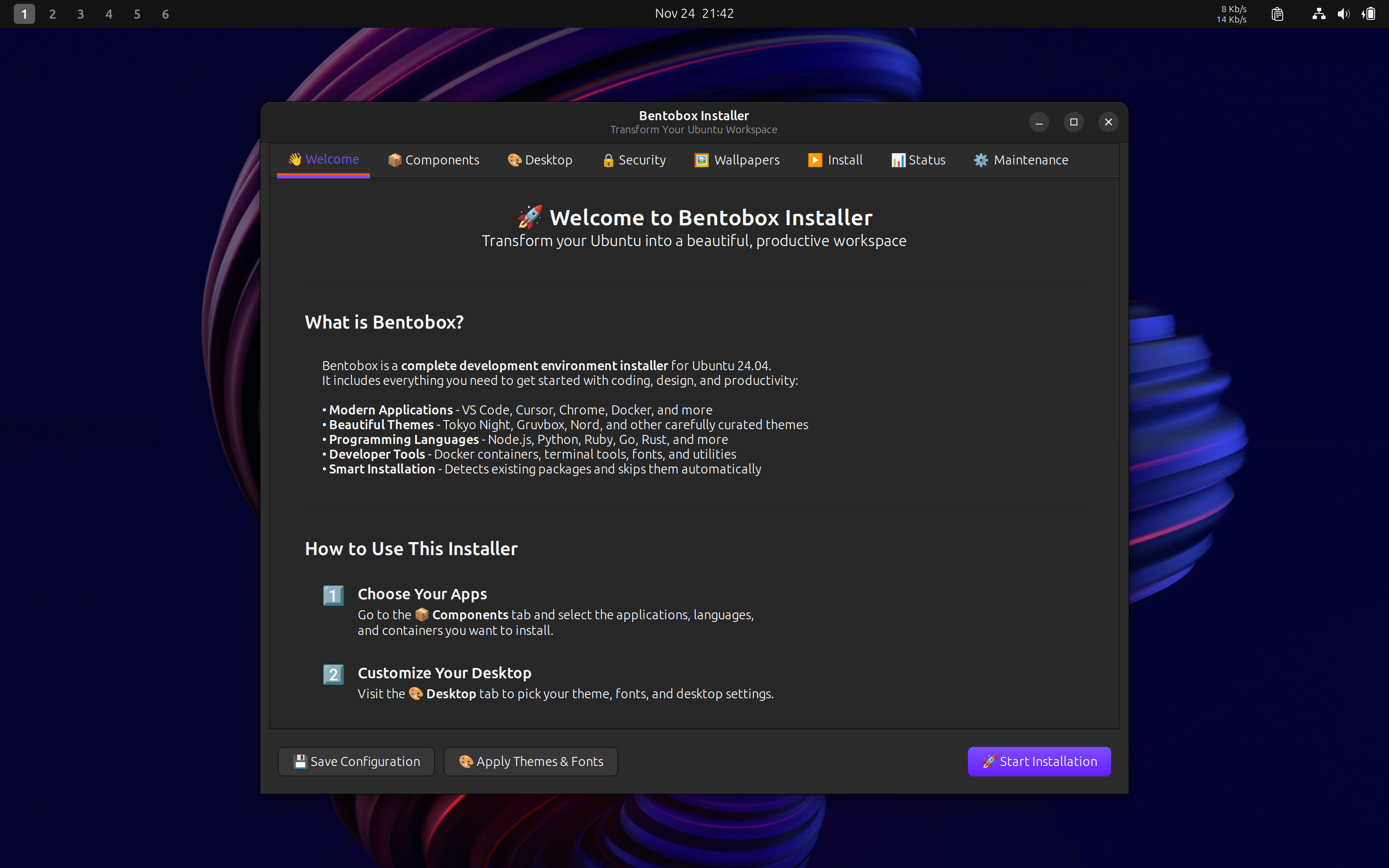
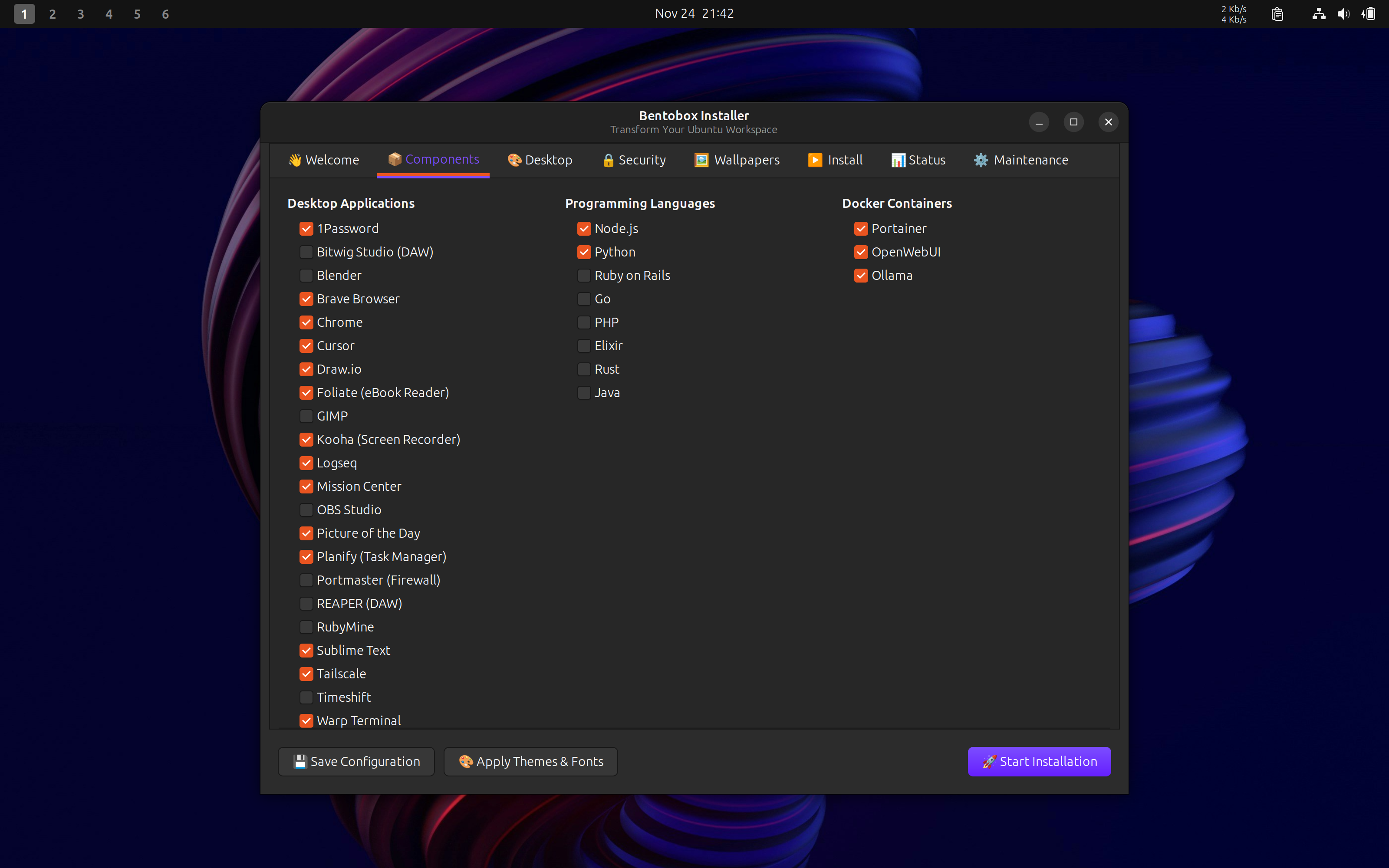
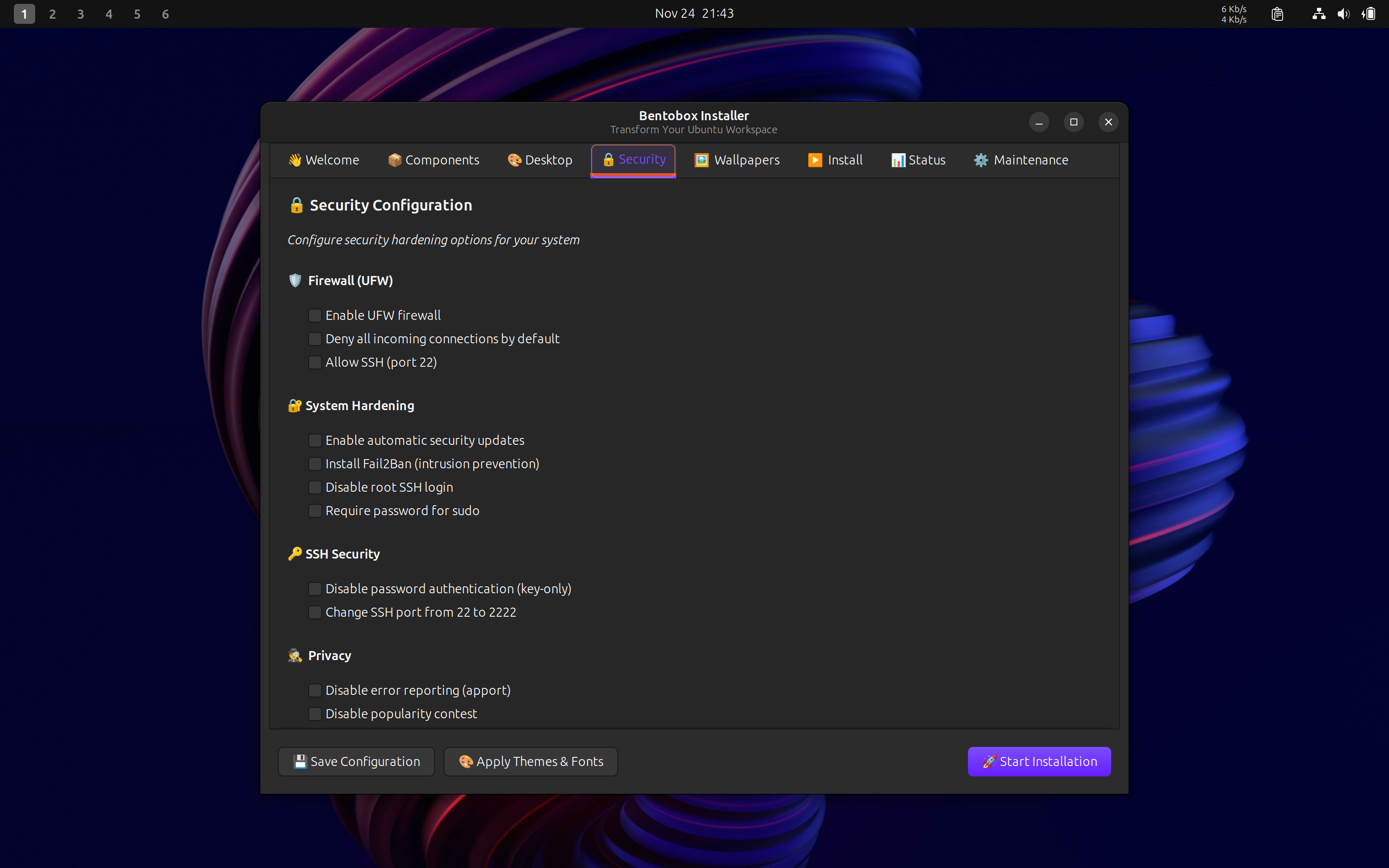
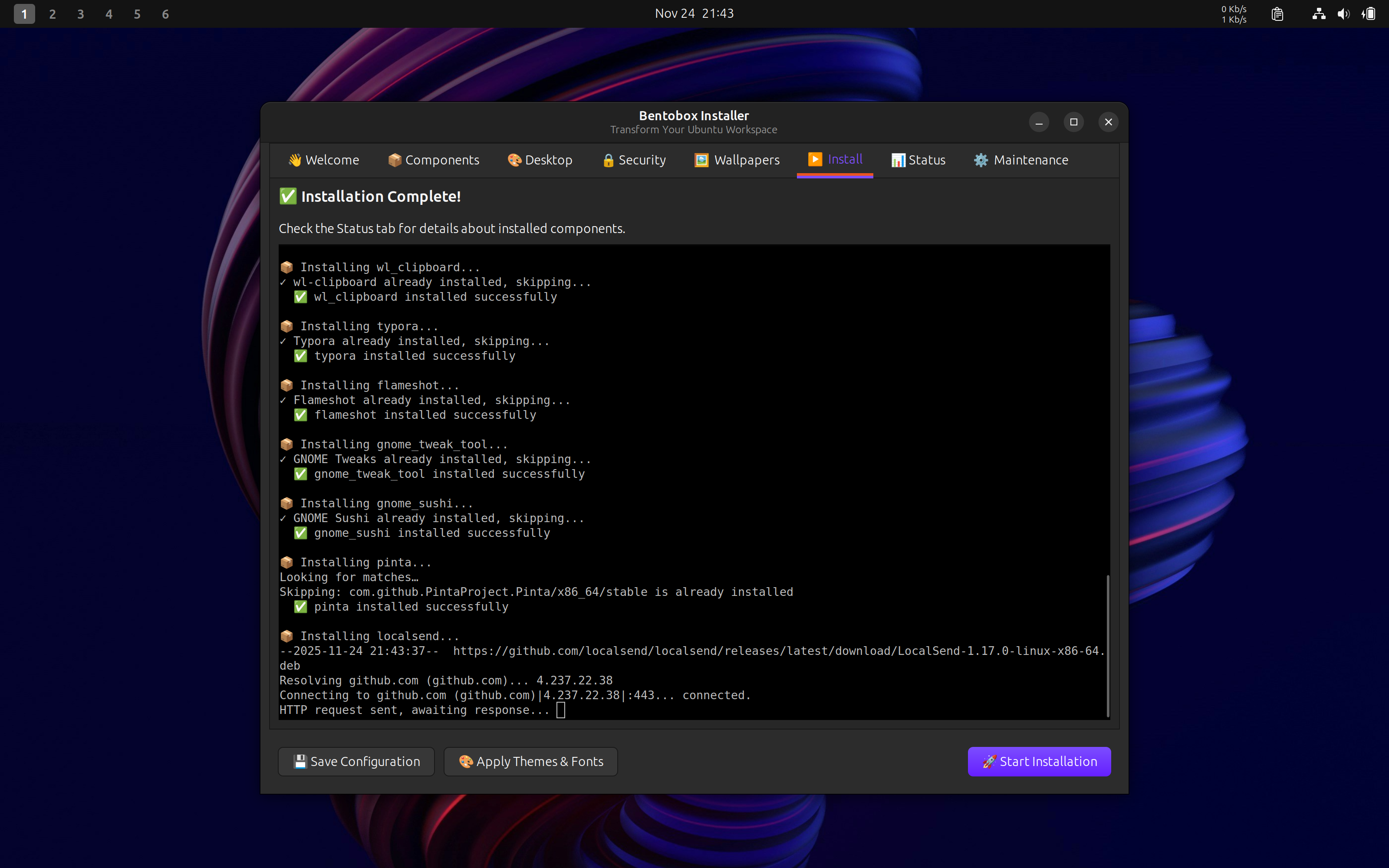
- GUI Installer: No terminal required—select what you want with checkboxes
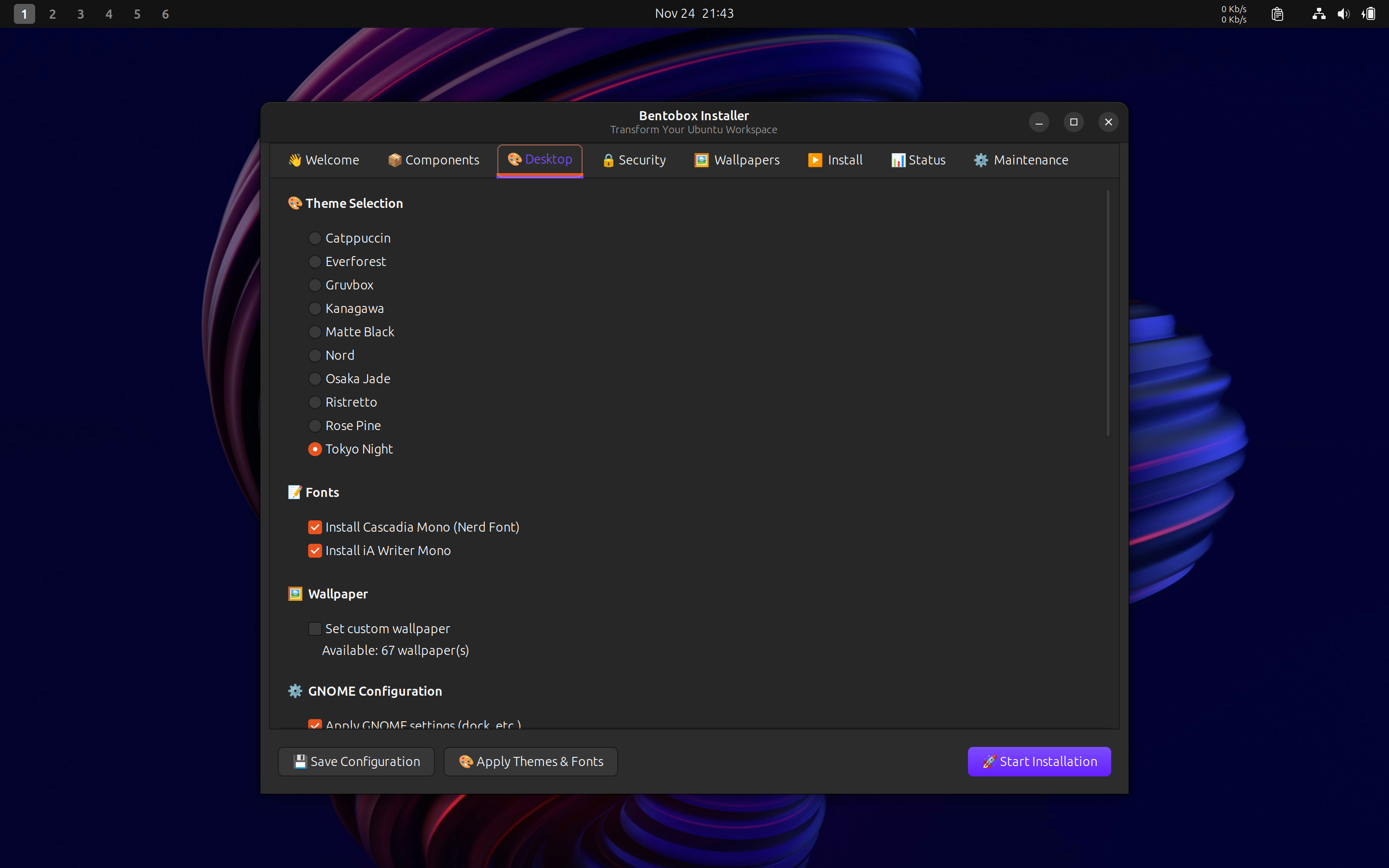
- Multiple Themes: Choose from professionally curated color schemes
Developers Also Get
- Modern Editors: VS Code, Neovim, Zed—all pre-configured
- Docker + Portainer: Visual container management at
localhost:9000 - OpenWebUI: AI chat interface at
localhost:3000 - Optional Ollama: Local LLM server for privacy-focused AI development
- Programming Languages: Ruby on Rails, Node.js, Python, Go, PHP, Elixir, Rust, Java (your choice)
- Fast Rebuilds: Machine dies? Back to full productivity in 30 minutes
Advanced Users Also Get
- Tailscale VPN: Secure remote access to your environment
- WinBoat (Optional): Run Windows apps seamlessly on Linux
- Barrier: Keyboard/mouse sharing across multiple computers
- Extension System: Add your own packages and themes with simple templates
- 1Password, Sublime Text: Professional tools available
🚀 Installation
It's genuinely this simple—one command on a fresh Ubuntu 24.04+ system:
wget -qO- https://raw.githubusercontent.com/languageseed/bentobox/master/boot-gui.sh | bash
What happens next:
- GUI Launches: A beautiful desktop interface appears (no terminal skills needed)
- Make Your Choices: Check boxes for what you want—apps, languages, themes
- Automatic Installation: Bentobox installs and configures everything (15-30 minutes)
- Reboot: Restart when prompted
- Done: Your complete environment is ready
After Installation
Access your tools:
- Portainer:
http://localhost:9000(create admin account on first visit) - OpenWebUI:
http://localhost:3000 - Ollama (if installed):
http://localhost:11434
Optional setup:
- Download AI Models:
docker exec -it ollama ollama pull llama3.2 - Connect Tailscale:
sudo tailscale up - Configure WinBoat: Launch from applications menu
💡 Why Bentobox?
The Problems It Solves
1. Rebuild Friction
- Your machine dies or gets compromised → Panic and dread
- Fresh Ubuntu install → Lose 2-3 days getting productive again
- Can't replicate your setup → Each rebuild slightly different
- Fear of rebuilding prevents fresh installs → System debt accumulates
Bentobox's Solution: One command → 30 minutes → fully productive. It's insurance against catastrophe and freedom to experiment.
2. Windows/Mac Alternative
- Tired of Windows telemetry, bloat, and forced updates
- Can't afford Mac's premium pricing
- Want control over your computer
- But intimidated by Linux's complexity
Bentobox's Solution: Beautiful, approachable Ubuntu setup that just works. No technical knowledge required.
3. Development Environment Consistency
- Need same setup across multiple machines
- Team onboarding takes days
- Personal scripts are maintenance burden
- Want container-first, AI-ready workflows
Bentobox's Solution: Consistent, tested, community-maintained setup. Same environment everywhere.
Why Not Windows/Mac?
vs Windows:
- ✅ No telemetry tracking you
- ✅ No forced updates during work
- ✅ No bloatware
- ✅ Faster on older hardware
- ✅ Free forever
- ✅ Full control over your system
vs Mac:
- ✅ Free (save $1000+)
- ✅ Works on any hardware
- ✅ Full customization control
- ✅ Not locked to proprietary ecosystem
vs "Plain Ubuntu":
- ✅ No days of configuration
- ✅ Beautiful by default
- ✅ Everything pre-configured
- ✅ But still customizable
- ✅ 30 minutes vs 2-3 days
The Honest Trade-offs
Bentobox is perfect for:
- ✅ Developers needing reliable, fast rebuilds
- ✅ Privacy-conscious users
- ✅ Budget-conscious users (students, startups)
- ✅ Office/productivity work
- ✅ Linux-curious Windows users
- ✅ Anyone valuing control over convenience
You'll want dual boot if:
- ⚠️ Gaming is important (keep Windows for that)
- ⚠️ You need Adobe Creative Cloud regularly
- ⚠️ Work requires specific Windows-only software
Bentobox isn't for:
- ❌ Hardcore gamers who only game (just use Windows)
- ❌ Mac users happy in that ecosystem
- ❌ People who love custom-building everything from scratch
🛠️ Customization & Extensibility
Bentobox is designed to be your foundation, not your limitation.
Extension System
Want to add applications or customize themes? Bentobox has a simple metadata-based extension system:
- Add New Apps: Copy a template, edit metadata, make it executable—your app appears in the GUI automatically
- Create Themes: Design custom color schemes and wallpapers
- Share Extensions: Easy pull request workflow for community contributions
- Templates Provided: Ready-to-use templates in
.templates/directory
Complete documentation available:
- Extension format specification
- Developer guide (create extensions in 5 minutes)
- Theme system guide
- Architecture documentation
Advanced Features
For developers:
- Container-first development with Portainer
- AI integration with OpenWebUI and optional Ollama
- Remote access via Tailscale VPN
- Keyboard/mouse sharing with Barrier
For Windows migrants:
- Optional WinBoat for running Windows apps (Linux as primary, Windows as guest)
- Or simply dual boot for gaming and Windows-exclusive software
📚 Documentation & Support
The repository includes comprehensive documentation:
- Installation Guide: Step-by-step setup instructions
- GUI Guide: Using the desktop installer
- Extension System: Complete specs and developer guides
- Theme System: Creating and customizing themes
- Post-Installation Setup: AI models, Tailscale, WinBoat configuration
- Troubleshooting Guide: Common issues and solutions
- Known Issues: Ulauncher crashes (cosmetic), GDM customization (Ubuntu limitation)
🙏 Credits & License
Bentobox is released under the MIT License and is built on the excellent foundation of Omakub by DHH and contributors. Huge thanks to the original project for creating such a solid base to build upon.
Wallpapers: Special thanks to the Unsplash and Pexels photography communities! Bentobox includes 60+ professionally curated wallpapers from 64 talented photographers:
- Licensed under Unsplash License and Pexels License - free to use, modify, and distribute
- Full credits and licensing details available in the repository's
wallpaper/LICENSE.md
🔗 Get Started
Ready to try Bentobox?
- Repository: github.com/languageseed/bentobox
- Installation: One command (see above)
- Report Issues: github.com/languageseed/bentobox/issues
- Original Omakub: github.com/basecamp/omakub
🌟 Final Thoughts
Bentobox isn't trying to be everything to everyone. It solves specific problems:
- Eliminates rebuild friction → 30 minutes instead of 3 days
- Provides a beautiful Windows/Mac alternative → Approachable, no technical knowledge required
- Offers a Linux migration path → Keep Windows available (dual boot or WinBoat) while making Linux primary
- Saves time and money → Free, fast, and consistent across machines
Whether you're setting up a new development machine, looking for a Windows alternative, or want to try Linux without burning bridges, Bentobox provides a thoughtfully curated starting point.
It's Ubuntu made beautiful and easy. Give it a try.
Have questions or suggestions? Feel free to open an issue on the GitHub repository.